You can use below statement to look into those objects to which you have access
select * from user_tab_columns where column_name=''
else to check in those objects to which you dont have access as well, you can use the below queries
select * from all_tab_columns
select * from dba_tab_columns
Tuesday, June 26, 2012


Monday, May 28, 2012
How to append path to Environment variable in Linux
The current value set to my environment variable PATH is
oracle@mymachine currentdirctory]$ echo $PATH
/home/oracle/Program/jdk1.6.0_21/bin:/home/oracle/app/oracle/product/11.1.0/client_1/bin:.:/home/oracle/Program/jdk1.6.0_21/bin:/home/oracle/app/oracle/product/11.1.0/client_1/bin:/usr/kerberos/bin:/usr/local/bin:/bin:/usr/bin:/home/oracle/bin
Add new enviroment variable and set the path
[oracle@mymachine currentdirctory]$ export ANT_HOME=/home/oracle/myproject/apache-ant-1.8.4
Add the above path to PATH variable
[oracle@mymachine currentdirctory]$ export PATH=${PATH}:${ANT_HOME}/bin
[oracle@mymachine currentdirctory]$ echo $PATH
/home/oracle/Program/jdk1.6.0_21/bin:/home/oracle/app/oracle/product/11.1.0/client_1/bin:.:/home/oracle/Program/jdk1.6.0_21/bin:/home/oracle/app/oracle/product/11.1.0/client_1/bin:/usr/kerberos/bin:/usr/local/bin:/bin:/usr/bin:/home/oracle/bin:/home/oracle/myproject/apache-ant-1.8.4/bin
You can see that the environmet path is appended.
oracle@mymachine currentdirctory]$ echo $PATH
/home/oracle/Program/jdk1.6.0_21/bin:/home/oracle/app/oracle/product/11.1.0/client_1/bin:.:/home/oracle/Program/jdk1.6.0_21/bin:/home/oracle/app/oracle/product/11.1.0/client_1/bin:/usr/kerberos/bin:/usr/local/bin:/bin:/usr/bin:/home/oracle/bin
Add new enviroment variable and set the path
[oracle@mymachine currentdirctory]$ export ANT_HOME=/home/oracle/myproject/apache-ant-1.8.4
Add the above path to PATH variable
[oracle@mymachine currentdirctory]$ export PATH=${PATH}:${ANT_HOME}/bin
[oracle@mymachine currentdirctory]$ echo $PATH
/home/oracle/Program/jdk1.6.0_21/bin:/home/oracle/app/oracle/product/11.1.0/client_1/bin:.:/home/oracle/Program/jdk1.6.0_21/bin:/home/oracle/app/oracle/product/11.1.0/client_1/bin:/usr/kerberos/bin:/usr/local/bin:/bin:/usr/bin:/home/oracle/bin:/home/oracle/myproject/apache-ant-1.8.4/bin
You can see that the environmet path is appended.
Thursday, May 17, 2012
Determine the port number for Database Control
On Linux and UNIX systems:
You can check the file in below metioned path
On Microsoft Windows systems:
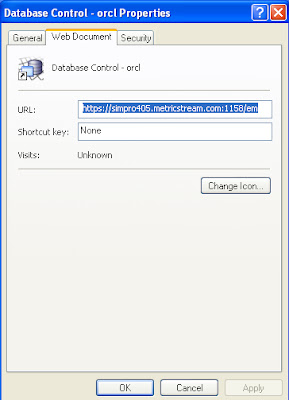
This can be checked from the Database Control Properties window.
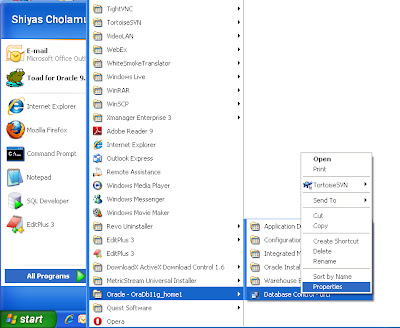
Go to the Start menu, navigate to the Database Control entry in the Oracle home folder, then right-click this entry and select Properties.
You can check the file in below metioned path
Oracle_home/install/portlist.iniOn Microsoft Windows systems:
This can be checked from the Database Control Properties window.

Go to the Start menu, navigate to the Database Control entry in the Oracle home folder, then right-click this entry and select Properties.

Setting the GLOBAL_NAMES Initialization Parameter
1. Log in to Enterprise Manager as an administrative user who can change initialization parameters.
See "Access oracle enterprise manager home page"
2. Go to the Database Home page for the database instance.

3. Click Server to open the Server subpage.
4. Click Initialization Parameters in the Database Configuration section.

5. If you are using a server parameter file, then click SPFile. Otherwise, proceed to the next step.
6. On the Initialization Parameters page, enter

7. Set the appropriate value.
See "Access oracle enterprise manager home page"
2. Go to the Database Home page for the database instance.

3. Click Server to open the Server subpage.
4. Click Initialization Parameters in the Database Configuration section.

5. If you are using a server parameter file, then click SPFile. Otherwise, proceed to the next step.
6. On the Initialization Parameters page, enter
GLOBAL_NAMES in the search tool.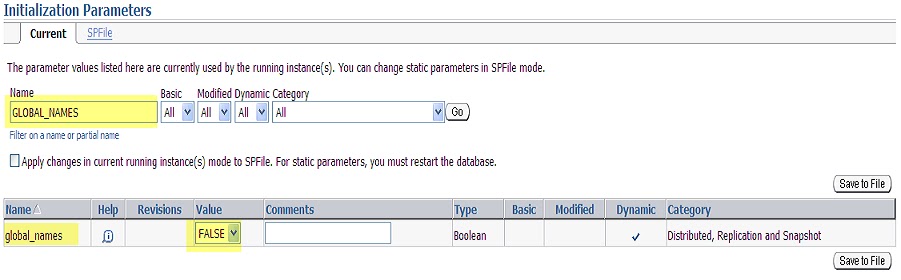
7. Set the appropriate value.
Access Oracle Enterprise Manager Home Page
Accessing the Database Home Page
The Database Home page is the main database management page in Oracle Enterprise Manager Database Control (Database Control).- Ensure that the
dbconsoleprocess is running on the database host computer. - In your Web browser, enter the following URL:
https://hostname:portnumber/emFor example, if you installed the database on a host computer named computer.example.com, and the installer indicated that your Enterprise Manager Console HTTP port number is 1158, enter the following URL:https://comp42.example.com:1158/em

- When you access Database Control, if the database is running, it displays the Login page. If the database is down and needs to be restarted, Database Control displays the Startup/Shutdown and Perform Recovery page.
Monday, May 14, 2012
CREATE SCHEMA in Oracle Database
Oracle Database automatically creates a schema when you create a user.
Use the
CREATE USER statement to create and configure a database user.PREREQUISITES:
You must have the
CREATE USER system privilege. For the user to login to the Oracle Database, must have the CREATE SESSION system privilege. Therefore, after creating a user, you should grant the user at least the CREATE SESSION system privilege. EXAMPLE:
CREATE
USER DEVIDENTIFIED BY DEVDEFAULT TABLESPACE DATATEMPORARY TABLESPACE TEMPPROFILE DEFAULT
DEFAULT TABLESPACE Clause:
Specify the default tablespace for objects that the user creates. If you omit this clause, then the user's objects are stored in the database default tablespace. If no default tablespace has been specified for the database, then the user's objects are stored in the
SYSTEM tablespace.TEMPORARY TABLESPACE Clause :
Specify the tablespace or tablespace group for the user's temporary segments. If you omit this clause, then the user's temporary segments are stored in the database default temporary tablespace or, if none has been specified, in the
SYSTEM tablespace.ACCOUNT UNLOCK; - Specify
tablespaceto indicate the user's temporary tablespace. - Specify
tablespace_group_nameto indicate that the user can save temporary segments in any tablespace in the tablespace group specified bytablespace_group_name.
Wednesday, April 18, 2012
ORA-12514: TNS:listener does not currently know of service requested in connect descriptor
I tried to connect to DB from command prompt as below and recieved ORA-12514 error
ORA-12514: TNS:listener does not currently know of service requested in connect descriptor
Cause: The listener received a request to establish a connection to a database or other service. The connect descriptor received by the listener specified a service name for a service (usually a database service) that either has not yet dynamically registered with the listener or has not been statically configured for the listener. This may be a temporary condition such as after the listener has started, but before the database instance has registered with the listener.
Action: - Wait a moment and try to connect a second time.
- Check which services are currently known by the listener by executing: lsnrctl services <listener name>Cause: The listener received a request to establish a connection to a database or other service. The connect descriptor received by the listener specified a service name for a service (usually a database service) that either has not yet dynamically registered with the listener or has not been statically configured for the listener. This may be a temporary condition such as after the listener has started, but before the database instance has registered with the listener.
Action: - Wait a moment and try to connect a second time.
- Check that the SERVICE_NAME parameter in the connect descriptor of the net service name used specifies a service known by the listener.
- If an easy connect naming connect identifier was used, check that the service name specified is a service known by the listener.
- Check for an event in the listener.log file.
Analysis:
This form of the ORA-12541 error commonly happens when the database or the listener processes are in the middle of a startup, or when the database has not been registered with the listener or when the service name you provided in the connection string may be different from the one specified in tnsnames.ora file.
Conclusion:
I found the service name provided in tnsnames.ora file is orcl.mysystem.com and hence tried connecting as below
Result: Succesfully Connected.
Subscribe to:
Posts (Atom)