Showing posts with label Oracle. Show all posts

Thursday, May 16, 2013

Thursday, May 17, 2012

Determine the port number for Database Control

On Linux and UNIX systems:

You can check the file in below metioned path
 Oracle_home/install/portlist.ini

On Microsoft Windows systems:
This can be checked from the Database Control Properties window.


Go to the Start menu, navigate to the Database Control entry in the Oracle home folder, then right-click this entry and select Properties.

Setting the GLOBAL_NAMES Initialization Parameter

1. Log in to Enterprise Manager as an administrative user who can change initialization parameters.
See "Access oracle enterprise manager home page"
2. Go to the Database Home page for the database instance.
 
3. Click Server to open the Server subpage.

4. Click Initialization Parameters in the Database Configuration section.

5. If you are using a server parameter file, then click SPFile. Otherwise, proceed to the next step.

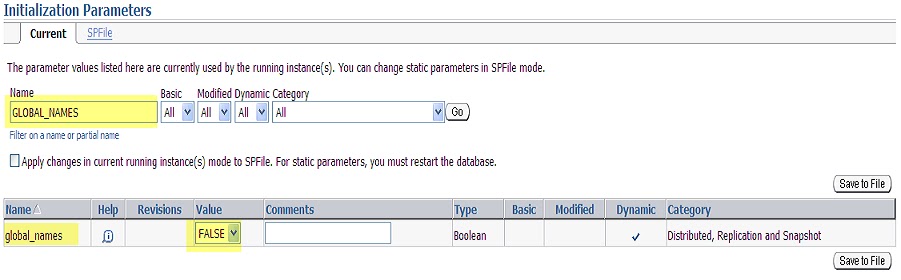
6. On the Initialization Parameters page, enter GLOBAL_NAMES in the search tool.

7. Set the appropriate value.

Access Oracle Enterprise Manager Home Page

Accessing the Database Home Page

The Database Home page is the main database management page in Oracle Enterprise Manager Database Control (Database Control).
To access the Database Home page:
  1. Ensure that the dbconsole process is running on the database host computer.
  2. In your Web browser, enter the following URL:
    https://hostname:portnumber/em
    
    For example, if you installed the database on a host computer named computer.example.com, and the installer indicated that your Enterprise Manager Console HTTP port number is 1158, enter the following URL:
    https://comp42.example.com:1158/em
  1. When you access Database Control, if the database is running, it displays the Login page. If the database is down and needs to be restarted, Database Control displays the Startup/Shutdown and Perform Recovery page.

Monday, May 14, 2012

CREATE SCHEMA in Oracle Database


Oracle Database automatically creates a schema when you create a user.

Use the CREATE USER statement to create and configure a database user.


PREREQUISITES:
You must have the CREATE USER system privilege. For the user to login to the Oracle Database, must have the CREATE SESSION system privilege. Therefore, after creating a user, you should grant the user at least the CREATE SESSION system privilege.

EXAMPLE:

CREATE


USER DEVIDENTIFIED BY DEVDEFAULT TABLESPACE DATATEMPORARY TABLESPACE TEMPPROFILE DEFAULT

DEFAULT TABLESPACE Clause:

Specify the default tablespace for objects that the user creates. If you omit this clause, then the user's objects are stored in the database default tablespace. If no default tablespace has been specified for the database, then the user's objects are stored in the SYSTEM tablespace.

TEMPORARY TABLESPACE Clause :

Specify the tablespace or tablespace group for the user's temporary segments. If you omit this clause, then the user's temporary segments are stored in the database default temporary tablespace or, if none has been specified, in the SYSTEM tablespace.
ACCOUNT UNLOCK;
  • Specify tablespace to indicate the user's temporary tablespace.
  • Specify tablespace_group_name to indicate that the user can save temporary segments in any tablespace in the tablespace group specified by tablespace_group_name.

Wednesday, April 18, 2012

ORA-12514: TNS:listener does not currently know of service requested in connect descriptor

I tried to connect to DB from command prompt as below and recieved ORA-12514 error


ORA-12514:  TNS:listener does not currently know of service requested in connect descriptor

Cause: The listener received a request to establish a connection to a database or other service. The connect descriptor received by the listener specified a service name for a service (usually a database service) that either has not yet dynamically registered with the listener or has not been statically configured for the listener. This may be a temporary condition such as after the listener has started, but before the database instance has registered with the listener.

Action: - Wait a moment and try to connect a second time.
- Check which services are currently known by the listener by executing: lsnrctl services <listener name>
- Check that the SERVICE_NAME parameter in the connect descriptor of the net service name used specifies a service known by the listener.
- If an easy connect naming connect identifier was used, check that the service name specified is a service known by the listener.
- Check for an event in the listener.log file.

Analysis:
This form of the ORA-12541 error commonly happens when the database or the listener processes are in the middle of a startup, or when the database has not been registered with the listener or when the service name you provided in the connection string may be different from the one specified in tnsnames.ora file.

Conclusion:
I found the service name provided in tnsnames.ora file is orcl.mysystem.com and hence tried connecting as below


Result: Succesfully Connected.

Thursday, February 2, 2012

Oracle 11g: Additional Features

Oracle 11g has come up with new functionality which makes many common operations simple and fast. There are tones of newly added features in 11g. Let me take you through few of them.

DDL Wait Option:
You might have come across with the scenario that whenever you try to execute an alter statement on a particular table, instead of getting a success message on your window an error occurs as displayed below

ERROR at line 1:
ORA-00054: resource busy and acquire with NOWAIT specified or timeout expired

This will be irritating most of the time.

The reason behind this error is, some other session is doing some activity on this table and has acquired a lock because of which an exclusive lock request for changing the structure of the table is not provided and hence the error message. The person trying to alter the table has to keep on hitting the alter statement until the next session complete the task and do a commit. This is a painful task. In a large system where the business activity happens very frequently the possibility of having the tables objects unlocked is comparatively less.

Oracle 11g comes up with a solution for this. Set the waiting period for the lock.
 
SQL> alter session set ddl_lock_timeout = 10;

Now, when the DDL statement is submitted, it will wait for 10 sec and in this 10 sec keep on checking for an exclusive lock to do the changes and if not found throws error.

This parameter value can be set at session level and system level as well.
ALTER SYSTEM SET DDL_LOCK_TIMEOUT = 10;

Adding columns with default value:
Most of the time a developer will come across a situation where he/she has to add one additional column to an exiting table having data. Say for example our table has 4 million data. And what if this column should have a NOT NULL constraint?

The only option available is to write the alter statement specifying the default value as below.

SQL> alter table emp add emp_spousename varchar2(20) default 'xxx' NOT NULL;

Now we have a issue here, if we proceed with this statement. Oracle will add the additional column and update default value for all the existing records. This process not only take a long time but fills up the undo segment, generates a large amount of redo and performance issue as well. So we have to go for a down time for the application to complete this task. But not, if we are using 11g.

In Oracle 11g, this particular column will be added but the column values are not updated with the  default value. Hence there is no risk of filling up of undo segment and generating redo files and no performance issue as well. For new records added the default value will be set and for existing records, when a user fires a select query Oracle refers the data dictionary to get info on this column and substitutes the default value.

Virtual Columns:
Scenario: A new col has to be added to a table for which the value is generated based on some business condition.

Here the business don't want to do any changes to the code to populate value into the column. Now only option left to the developer is to create a trigger to populate value into this particular column. This is a bad habit as it has performance impact due to switching context from and into the trigger codes.

Oracle 11 g comes up with a solution for this. Create a virtual column.

When we say virtual columm its really virtual. You have the column created in table but the functionality is different from normal cols.

SQL> create table sales
  2  (
  3     sales_id      number,
  4     cust_id       number,
  5     sales_amt     number,
  6     sale_category varchar2(6)
  7     generated always as
  8     (
  9        case
10           when sales_amt <= 10000 then 'LOW'
11           when sales_amt > 10000 and sales_amt <= 100000 then 'MEDIUM'
12           when sales_amt > 100000 and sales_amt <= 1000000 then 'HIGH'
13           else 'ULTRA'
14        end
15      ) virtual
16  );

Note lines 6-7; the column is specified as "generated always as", meaning the column values are generated at runtime, not stored as part of the table. That clause is followed by how the value is calculated in the elaborate CASE statement. Finally, in line 15,"virtual" is specified to reinforce the fact that this is a virtual column. Now, if you insert some records:
SQL> insert into sales (sales_id, cust_id, sales_amt) values (1,1,100);
 
1 row created.
 
SQL> insert into sales (sales_id, cust_id, sales_amt) values (2,102,1500);
 
1 row created.
 
SQL>insert into sales (sales_id, cust_id, sales_amt) values (3,102,100000);
 
1 row created.
 
SQL> commit;
 
Commit complete.
 
SQL> select * from sales;
 
SALES_ID   CUST_ID  SALES_AMT SALE_C
----------      ----------    ----------     ------
1          1        100       LOW
2          102      1500      LOW
3          102      100000    MEDIUM
 
3 rows selected.


You can't insert value in to this particular column.It will throw error.
You can create index and it will be a function-based index
You can also partition this particular column.

Invisible indexes
Indexing a column wont be helping us always. So we end up analyzing the impact of adding one index to a column.

You created an index on a column, ran the query which use this column in its WHERE clause and analyzed the performance. Now you want to test it without index and so you removed the index and later you need to recreate it. The recreation of an index is an expensive process.

Oracle 11g comes up with a solution. Make the index invisible. When you say the index to be invisible the optimizer wont be able to see this index and query is processed without index. If you want to use this invisible index in your query you have to specifally mention that using Hint.

SQL> alter index index_name invisible;
 
select /*+ index (table index_name) */ id form emp;

By giving this hint, Oracle optimizer will be able to see the index and it will make use of the index while generationg the data.

Alternatively, you can set a session-level parameter to use the invisible indexes:
SQL> alter session set optimizer_use_invisible_indexes = true;


You  can see details about indexes in user_indexes table.

Read only tables.
This is mainly use in DWH. There use to be a periodical updates on every table. At this point of time we may come across a condition that the users should not do any DML statement on the tables.

To achieve this we either revoke the access or triggers with alert or create VPD (virtual private database) policy on the tables.

Revoking access is not advisable, triggers has performance issue and VPD policy eventhough better than triggers gives a wrong error message to the user.

Oracle 11g comes up with a new solution: Change the read only status

SQL> alter table emp read only;
 
Table altered.

Now when a user tries to issue a DML such as that shown below:
SQL> delete trans;

Oracle Database 11g throws an error right away:
delete trans
       *
ERROR at line 1:
ORA-12081: update operation not allowed on table "SCOTT"."TRANS"

The error message does not reflect the operation to the letter but conveys the message as intended, without the overhead of a trigger or VPD policy.
When you want to make the table update-able, you will need to make it read/write, as shown below:
SQL> alter table trans read write;
 
Table altered.

Now DMLs will be no problem:
SQL> update trans set amt = 1 where trans_id = 1;
 
1 row updated.

With creating read only option an user is only blocked from DML statements but not from DDL, the user can perform DDLs like creating index, managing partition etc...

Fine-Grained Dependency Tracking

Create a new table, create a view on this table selecting few columns for information hiding. On checking the dependency status of the view you can see this view depends on above table and status in VALID.

Change the sturcture of the table, say add a new column. Check the dependency of view, you can see it as INVALID even though that column is not used in view, as it is a child depending on parent table. This happens only in 10g and all previous releases.

Your application go for toss, Recompile the view will help you to make it active.

Oracle 11g wont invalidate the view is such scenario. All dependent objects of the view, such as other views, packages and procedures are also valid.
Overall availability of entire application is ensured. No need to stop the app during some changes.

If the column involved in view is altered then view go inactive which is desirable.

This scenario is applicable with other DB objects like procedures and packages as well. For example you have created a package which is being called form one of your function. Here your function depend on the package. Now for some reason you modified your package to add one more procedure and your function goes invalid in 10g and all below versions but not in 11g.

Here there is one exceptional scenario where if the new procedure is added at first position the depending object, function will be invalid in 11g as well because the slot provided for the procedures in package is rearranged. If we are adding new procedure after the existing one, we merely add one additional slot.


****
Hope this is helpful. Phoenix

Friday, December 30, 2011

How do Oracle process Hierarchical queries

Not yet published. Sorry for the inconvenience caused.

Oracle Hierarchical queries


It was really confusing when I was going through the documentation of Oracle Hierarchical queries for the first time. I red it many times to understand it well,  practiced many times to save it in my memory and put it down in my own words so that it stays there for a long time in the way I understood it. And I hope you too can understand it well.

When we talk about hierarchical queries, then it is very well clear that we are dealing with hierarchical data. Hope you know what a hierarchical data refers to. It can be a parent child relation, boss to employee relation, manager to reportee etc. So whatever such data we have in a table we need to select the data suitable to our convenience.

Understanding Hierarchical query clause:
When we are trying to fetch data from our hierarchical table, it is very obvious that we need to know two things.
  1. From which level of hierarchy we need to start? That is we need a starting point.
  2. What kind of relationship are we looking in this hierarchy? That is we need a connection between the data.
Hope you understood above two parts, if then, you wont forget your hierarchical query clause hereafter. For our hierarchical query clause we need both the above "start with" and "connect" keywords.

START WITH condition CONNECT BY condition

Hence START WITH specifies the root row of the hierarchy and CONNECT BY specifies the relationship between the parent rows and child rows of the hierarchy.

Initially while I was going through the examples of hierarchical query the operation PRIOR was so confusing for me and I was not able to understand this code well enough. Then I learned in a different method and now it become easy for me. Let me try to explain it in the below example.

--Create one table to hold our hierarchical data

SQL*Plus: Release 10.2.0.1.0 - Production on Fri Dec 30 17:52:02 2011
Copyright (c) 1982, 2005, Oracle.  All rights reserved.

Connected to:
Oracle Database 10g Enterprise Edition Release 10.2.0.5.0 - 64bit Production
With the Partitioning, OLAP, Data Mining and Real Application Testing options
SQL> create table hierarchy_test
  2  (
  3  emp_id number(10),
  4  l_name varchar2(10),
  5  m_name varchar2(10),
  6  f_name varchar2(10),
  7  manager_id number(10),
  8  constraint hierarchy_test_pk primary key (emp_id)
  9  );
Table created.
SQL>

--Now insert the hierarchical data into this table

 SQL> INSERT INTO hierarchy_test VALUES (100,'King','','','');
1 row created.
SQL> INSERT INTO hierarchy_test VALUES (101,'Scott','','','100');
1 row created.
SQL> INSERT INTO hierarchy_test VALUES (102,'King','','',101);
1 row created.
SQL> INSERT INTO hierarchy_test VALUES (103,'King','','',101);
1 row created.
SQL> INSERT INTO hierarchy_test VALUES (104,'King','','',101);
1 row created.
SQL> INSERT INTO hierarchy_test VALUES (105,'King','','',103);
1 row created.
SQL> INSERT INTO hierarchy_test VALUES (106,'King','','',103);

--Example for hierarchical query
SQL> select emp_id, manager_id, level
  2  from hierarchy_test
  3  start with emp_id=100
  4  connect by  PRIOR emp_id =  manager_id
  5  order by level;


    EMP_ID MANAGER_ID      LEVEL
---------- ---------- ----------
       100                     1
       101        100          2
       104        101          3
       102        101          3
       103        101          3
       106        103          4
       105        103          4
7 rows selected.

You can use PRIOR keyword on either side of the operator '='. But I got confused why? What difference does it make. Also I was not able to understand why this keyword is used here.

Let me read this clause as below so that I make sure that I understood it well.

connect by  PRIOR emp_id =  manager_id
as
connect by previous emp_id = manager_id of the current row.

So, here in the example, first row emp_id=100, manager_id=null.
Now to get the current row get all the records for which the manager_id is equal to the employee id of the previous record. Now you go back and look into the result, you will be clear on why we use PRIOR in our code.

You can rewrite the above code as below with same result, as per my above sentence.

 SQL> select emp_id, manager_id, level
  2  from hierarchy_test
  3  start with emp_id=100
  4  connect by   manager_id =PRIOR emp_id
  5  order by level;
    EMP_ID MANAGER_ID      LEVEL
---------- ---------- ----------
       100                     1
       101        100          2
       104        101          3
       102        101          3
       103        101          3
       106        103          4
       105        103          4
7 rows selected.
SQL>

What if you give the PRIOR keyword just opposite as below for our data?

SQL> select emp_id, manager_id, level
  2  from hierarchy_test
  3  start with emp_id=100
  4  connect by   emp_id =  PRIOR manager_id
  5  order by level;
    EMP_ID MANAGER_ID      LEVEL
---------- ---------- ----------
       100                     1
SQL>

We get only one result set right?
Here what happens is we started with emp_id 100 and for the next row we said that, get me the row for which the employee id is the manager id of the previous record!!

Ooops!!
Kind don't have a manager and hence we have that column value as null. Hence oracle doesn't find any way to proceed further. Hence we got only one record.

Hope you got my point.

Now, what if I am not using the start by keyword. Your code will work but result is bad and not as expected.

SQL> select emp_id, manager_id, level
  2  from hierarchy_test
  3  connect by  PRIOR emp_id =  manager_id

    EMP_ID MANAGER_ID      LEVEL
---------- ---------- ----------
       104        101          1
       106        103          1
       101        100          1
       103        101          1
       105        103          1
       100                     1
       102        101          1
       106        103          2
       105        103          2
       104        101          2
       103        101          2
    EMP_ID MANAGER_ID      LEVEL
---------- ---------- ----------
       102        101          2
       101        100          2
       104        101          3
       102        101          3
       103        101          3
       105        103          3
       106        103          3
       106        103          4
       105        103          4
20 rows selected.
SQL>


Level 4 considers only 105 and 106 whereas level 3 consider 105,106, 102, 103 and 104 and it goes like that till level 1. Hence give the start with keyword with your hierarchical query.

Related Articles:
How do Oracle process Hierarchical queries.


****
Hope this is useful. Thanks Phoenix.


Thursday, December 22, 2011

Oracle sql statement processing steps.

Whenever a SQL statement is submitted to execute, Oracle goes through the below mentioned steps

  1. Check for identical statements in memory to avoid performance overhead due to parsing.
  2. Allocate memory in shared memory area.
  3. Evaluate the syntax of the statement to check whether all the oracle key words are spell correctly.
  4. Do semantic check, where all the objects (tables or columns) are validated and check for the user's privilege to access these objects.
  5. Form an execution plan to execute the statement.
****
Hope this is useful. Thanks Phoenix

Wednesday, December 21, 2011

Oracle Autonomous Transaction


Let me try to explain Oracle Autonomous Transaction in a little different way so that you can remember it very easily.

How many different types of plsql blocks can you write?

Ooops!!

Procedures and Functions are the pls/ql blocks written uniquely with or without parameters. What else could I do with this? What are all these different types available? Let us try it out.

1. We use to write a Procedure/Function without giving it a name for adhock purpose as we don't want to store that in the database to use it later. - ANONYMOUS PROC/FUNC

2. We use to use this anonymous items in declaration section of plsql as well - LOCAL PROC/FUNC

3. When we need this proc/func to be stored in database to use frequently, we store it with a name tagged to it- STAND ALONE PROC/FUNC or say stored Procedure or Function.

4. To logically group our procs/funcs we can place these procedures or functions inside a package - PACKAGED PROC/FUNC

So now we know there are 4 different ways we can use procedures and functions.
We can use all the above mentioned different ways of proc/fncs for autonomous transactions.

Autonomous Transactions?????

I had heard about Autonomous Institutes we're they function independently.
PL/SQL autonomous transaction also work exactly the same. They function independently. It helps you leave the calling transaction and performs an individual transaction and resume to the calling transaction without affecting the calling transaction.

Confused? No need to worry. You will get it by the time you complete this.

Here calling transaction refers to your main PL/SQL block and the autonomous transaction is called from this block. The purpose of your main PL/SQL block and autonomous PL/SQL block is entirely different. Both behave as transaction done is seperate sessions. There is no link between both these type of transactions, hence only committed data can be shared among them.

Autonomous transaction code block is nothing but plsql blocks. Syntax is as below,

Example for anonymous:

DECLARE
PRAGMA AUTONOMOUS_TRANSACTION;
BEGIN
Statement;
COMMIT;
END;
/

Example for stored PROC:
CREATE OR REPLACE PROCEDURE PROCEDURE_NAME AS
PRAGMA AUTONOMOUS_TRANSACTION;
BEGIN
statement;
COMMIT;
END;
/

We have 5 different type of plsql blocks which can be used for this purpose. Four of them are those discussed above and the fifth one is "TYPE methods".

Let us try to understand autonomous transaction a little more deep by going through few scenarios.

1. You need to insert two records into an empty table.

INSERT INTO temp_table (id, name) VALUES (1, 'Scott');
INSERT INTO temp_table (id, name) VALUES (2, 'Peter');

Next without committing this transaction you want to execute an autonomous transaction, say an individual transaction.

Before executing the autonomous transaction, select count(*) give you result: 2

SELECT count(*) FROM temp_table;

Execute autonomous transaction which inserts 5 records to the same table and have a commit statement within this autonomous transaction code block.

DECLARE
PRAGMA AUTONOMOUS_TRANSACTION;
BEGIN
FOR i IN 3 .. 5 LOOP
INSERT INTO temp_table (id, name)
VALUES (i, 'Name ' || i);
END LOOP;
COMMIT;
END;
/

Now select count(*) give you result as expected:7

Now execute a rollback.

Rollback;

Select count(*) gives you only 5 as the result.

The records inserted in current transaction got rolled back. The commit affected only the autonomous transaction block.

Hope now, you are clear with how to user autonomous transaction.

Now the question is why should we use autonomous transaction?
It is most popularly used for error logging. In applications particularly like banking, you can't commit a transaction until it is successfully completed. Hence to capture any error that may happen in between any transaction we use autonomous transaction.

How can we use this?
Create a proc as autonomous which logs data into one table. Call this proc in the exceptional section of your plsql block before you rollback.The error data is committed successfully by the autonomous transaction and your calling block actions are rolled back

Restrict the use of autonomous transaction only for error logging, else it will be a disaster.

Hope you understood well. Regards Shiyas..


Friday, December 9, 2011

Oracle Interview Questions Part 1: SQL

Q: What is the difference between delete and truncate?
Ans:
1. Delete can be rolled back before commiting the transaction whereas a truncate cannot be rolled back
2. Delete is a DML whereas Truncate is DDL
3. Truncate deletes the entire data at once whereas delete does it row by row.
4. Truncate is faster and performance benefit when compated to delete, if the requirement is to flush the table completely.

Q: What is the syntax of DECODE function and what is the use?
Ans: It has the same functionality IF-THEN-ELSE statement.
syntax: decode(expression,search[,result,search,result..][,default])

Example:
select decode (department, 1, 'Finance',2,'Accounts', 'Miscellaneous') from dual;

Q: What does COALESE function does?
Ans:
COALESCE function goes through the given list of values/expressions and returns the first non null expression. If all the values/expressions are null then it returns null. COALESCE is similar to IF-THEN-ELSE statement.

syntax: coalesce( expr1, expr2, ... expr_n )
SELECT coalesce( firstname, middlename, lastname) result
FROM employees;

Its equivalent IF-THEN-ELSE is as below.

IF firstname is not null
THEN
result:=firstname;
ELSIF middlename is not null
THEN
result:=midddlename;
ELSIF lastname is not null
THEN
result:=lastname
ELSE
result:=null;
end if;

Q: A given column has values with NULL data. On sorting the column in ascending order, where does the null value comes? First or Last?

Ans: Last

Q: What is the default sort order in Oracle?

Ans: ascending


Q: Provided a list of numbers or characters or dates. What function helps you to retrieve the highes value from the list?
Ans: greatest(x,y,..)
and for the least it is least(x,y,..)

Q: The column firstname is of datatype varchar2 which has null values as well. What is the output of below function for a null value?
NVL(firstname,0)
Ans: NVL returns the passed value if the expression is null else returns the erpression.
Here the function fails as the column is of datatype varchar2 and the specified value is of type number. Hence it fails.

For NVL to work, the data type of both column and passing value should be same.

Q: How NVL2 works?
Ans: syntax: NVL2(X,Y,Z)
NVL2 returns Y if X is not null, else returns Z

Q: What is the syntax for NULLIF?
Ans: NULLIF(x,y)
function returns NULL if x=y else returns X

Q: Write an SQL query to fetch all the managers from an employee table whose JOB_ID ends with either '_MAN' or '_MGR'

Ans:
SELECT FIRST_NAME, LAST_NAME, JOB_ID
FROM EMPLOYEES
WHERE REGEXP_LIKE(JOB_ID, '(_m[an|gr])', 'i');

[parameter i indicates case-insensitive]

Q: Select every employee whose last name has a double vowel
(two adjacent occurrences of the same vowel).
Ans:
SELECT FIRST_NAME, LAST_NAME
FROM EMPLOYEES
WHERE REGEXP_LIKE(LAST_NAME, '([AEIOU])\1', 'i');

Q: Exmaple for using REGEXP_REPLACE

Ans:
SELECT PHONE_NUMBER "Old Format",
REGEXP_REPLACE(PHONE_NUMBER,
'([[:digit:]]{3})\.([[:digit:]]{3})\.([[:digit:]]{4})',
'(\1) \2-\3') "New Format"
FROM EMPLOYEES
WHERE DEPARTMENT_ID = 90;


Old Format                                              New Format
-----------------------------------------------------------------
515.123.4567 (515) 123-4567
515.123.4568 (515) 123-4568
515.123.4569 (515) 123-4569

The search pattern has three regular expressions, each of which is enclosed in parentheses. The metacharacter [[:digit:]] represents a digit, the metacharacter {n} specifies n occurrences, and the metacharacter \ is an escape character. The character immediately after an escape character is interpreted as a literal. Without the escape character, the metacharacter . represents any character. The replace string uses \1, \2, and \3 to represent the first, second, and third regular expressions in the search pattern, respectively. (In the replace string, \ is not an escape character.)


Q: Example to extract Street number including hyphen from the given street address.
Ans:
select street_address address, REGEXP_SUBSTR(street_address,'[[:digit:]-]+') "Number" from locations

Address                                   Number
-----------------------------------------------
2007              Zagora St 2007
2004              Charade Rd 2004
147                Spadina Ave 147
6092              Boxwood St 6092
40-5-12         Laogianggen 40-5-12


Q: Can we use a oracle keyword as alias in any select statement?
select 1 number from dual;

ORA-00923: FROM keyword not found where expected
00923. 00000 -  "FROM keyword not found where expected"
*Cause:   
*Action:
Error at Line: 1 Column: 9

solution: Use the keyword in double quotes

select 1 "number" from dual;

Output:
number
---------
1

Q: Example to count number of spaces in a street address
Ans:

Q: What is the result of below query? Why?
select 10000 + null from dual;

Ans: null. In oracle any scalar operation with null always results in null.

Friday, December 2, 2011

Find the number of occurence of a character in a given string in Oracle

Scenario: Need to find out the number of occurrence of a particular character in the given string.

Example: Find number of "e"s in the given string ("Oracle is an interesting thing to learn.")

Solution:
select length('Oracle is an interesting thing to learn') - length(replace('Oracle is an interesting thing to learn','e',''))
from dual;
4

Explained:
59-55 = 4, Hence four occurrence.

Another one Use Case:
Get number of comma separated values in a given column where the values are 100,123,124,145.

Use above method to find number of occurrence of character , (comma) in the givens string and add one to that gives you the number of comma separated values.


In Oracle 11g we have new function to save our time and shorten our code length.

REGEXP_COUNT

select regexp_count('EXPERIENCE','E') FROM DUAL;

This will give you the result 4.

Saturday, September 17, 2011

How to trim the column value while using SQL*LOADER

Scenario:
I was using sqlloader to load the data in my file data.csv to my table emp. The column size of lastname is varchar2(20), but the value in my csv file was having space appended to the name making the size more than 20. Hence when I use sqlloader it faisl with error.

Record 302: Rejected - Error on table emp, column lastname.
ORA-12899: value too large for column "SCHEMA"."EMP"."LASTNAME" (actual: 23, maximum: 20)


And this record goes to bad file. I have to go and check for such values and edit it manually for each and every one.

How can I use trim in my control file?

My Control file is as below:
OPTIONS (SKIP=1)
load data infile 'D:\Load\data.csv'
TRUNCATE into table emp fields
terminated by "," optionally enclosed by '"'
TRAILING NULLCOLS
(ID,FIRSTNAME ,LASTNAME)

Solution:
You can add trim into control file as below:
OPTIONS (SKIP=1)
load data infile 'D:\Load\data.csv'
TRUNCATE into table emp fields
terminated by "," optionally enclosed by '"'
TRAILING NULLCOLS
(ID "TRIM(:ID)",FIRSTNAME "TRIM(:FIRSTNAME)",LASTNAME"TRIM(:LASTNAME)")

This will solve the issue.

Monday, September 12, 2011

Oracle Global Temporary Table

Temporary tables were introduced from Oracle 8i onwards and is called global temporary tables. This is called temporary table because it is created when the data is inserted and is similar to normal tables.

Syntax:
create global temporary table temp_data
( emp_id number, emp_name varchar2(10));

The definition of this table is visible to all sessions, but the data is visible to only the session that creates this table. This is used by developers to store session/transaction specific data which can be ignored at the end of the session/transaction. On issuing a truncate on this table the data that is specific to the current session alone will get deleted.

It is possible to store the session specific data in this temporary table with the help of an additional cluase that we use while creating the table, on commit. We can define the temporary table either to delete or store the session specific data with "on commit" parameter.

Syntax:
create global temporary table temp_data
( emp_id number, emp_name varchar2(10))
on commit delete rows;

Here as soon as the transaction ends with a commit, the records in the table are deleted.

Syntax:
create global temporary table temp_data
( emp_id number, emp_name varchar2(10))
on commit preserve rows;

The above definition will preserve the data in the temporary table even after end of a transaction.

Limitations:

Temporary tables cannot contain nested tables or varray types or they cannot be partitioned, index-organized or clustered. They cannot be used in parallel DML or parallel queries and distributed transactions are not supported on these tables.

Oracle Interview Qestions Part 2: PL/SQL

Q: What is PL/SQL?
Ans: PL/SQL stands for Procedural Language extension of SQL.

Q: Where do we store a PL/SQL code?
Ans: In database and in client system as well.

Q: Is it possible to have two procedures in a same package with same name?
Ans: Yes, until you have these procedures accept different variables with different datatypes.

Q: A new procedure is added to a package body and it is not added to spedification. On combilation will this package be valid or invalid?
Ans: Valid. A procedure if not placed in the package specification doesnt lead the package to invalid state. It makes the procedure as private, ie this particular procedure cannot be called from any other package.

Q: How can we declare a procedure as private?
Ans: As explained above.

Q. What is a collection?
Ans:
Ordered group of elements, all of the same type, similar to lists and arrays.

Q: What is Record?
Ans:
A record is a group of related data items stored in fields, each with its own name and datatype. You can think of a record as a variable that can hold a table row, or some columns from a table row. The fields correspond to table columns.

Q: What are different types of Collections in PL/SQL?
Ans:
Nested Tables
Associative Arrays; similar to hash table
Variable-size arrays.

Q: What is a Subprogram?
Ans:
A named pl/sql block.

Q: What are different types of subprograms available in PL/SQL?
Ans:
Procedures and Functions.

Q: What is the difference between a procedure and function?
Ans:
Procedure does an action wheras function computes and return a value.

Q: What are the different blocks in PL/SQL?
Ans:
Declarative
Execution
Exception

Q: What all are the things that you can declare in Declaration section?
Ans:
Types
Cursors
Constants
Exceptions
Nested Subprograms
Variables

Q: How does nested table differ from arrays?
Ans:
1. Nested tables does not have declared number of elements whereas arrays has. Size of nested tables will increase dynamically.
2. Nested tables might not have consecutive subscripts whereas arrays always has.

You can delete elements from a nested table using the built-in procedure DELETE.

The built-in function NEXT lets you iterate over all the subscripts of a nested table, even if the sequence has gaps.

Q: What are the PL/SQL datatypes used to define collections?
Ans:
TABLE and VARRAY.

Q: How many types of tables are available in Oracle?
Ans:
Three Types:
Relational table (eg: employee table to hold employee data.)
Object tables
XMLType tables

Q: Different type of table level constraints?
Ans:
-Primary Key
-Unique Key
-Check
-Foriegn

Q: When do you use compressed tables?
Ans:
For some applications, particularly data warehousing, with large tables that are frequently queried but very rarely updated, you may create compressed tables. These require less disk storage than uncompressed tables (which are the default).

Q: What is the syntax for IF THEN ELSE statement in PL/SQL?

IF department=1 THEN
result:= 'Accounts'
ELSIF department='2' THEN
result:='Finance'
ELSE
result:='Miscellaneous'
END IF;


Q: What is the syntax for CASE statement in PL/SQL?
Ans: CASE perfoms the same function of IF-THEN-ELSE statement.
The sysntax is:
The syntax for the case statement is:
  CASE  [ expression ]
  WHEN condition_1 THEN result_1
  WHEN condition_2 THEN result_2
  ...
  WHEN condition_n THEN result_n
  ELSE result
END

Q: What are all the advantages of PLSQL?
Ans:
1. Tightly integrated with SQL
               a) You can perform all actions done by SQL with PLSQL
               b) PLSQL fully support SQL datatypes.

2. High Performance
               a) You can send a block of sql statements to the database, thereby reducing traffic.


3. Productivity

3. Portability & Scalability & Manageability
4. Support for Object-Oriented-Programming, Developing Web Applications, Developing Server Pages

Q: What is the difference between Static and Dynamic SQL?
Ans:
Static SQL is SQL whose full text is known at compilation time.
Dynamic SQL is SQL whose full text is known only at run time.

Understanding database Schema and Schema Objects

Tables, Indexes, views, synonyms, procedures, packages etc that exists in database is reffered as objects. These objects grouped together logically is called schema. This schema is owned by a user and the name of schema is same as user.

Hence schema is nothing but a logical structure created by database users, which is a collection of database objects.

Every object in a database belogns ton one schema and each object has a unique name within the schema. All objects that belongs to a single application is placed in same schema.

There are certain naming conventions that need to be followed while creating a new object
* Name of each object should be unique
* Name of object cannot be longer than 30 character
* Must begin with a letter.

Violating any of these rules results in Oracle error.

ORA-04021: timed out occured while waiting to lock object

Scenario:
I came across this error whilst trying to recompile a PL\SQL package in the database. It took some time to show this errro message, until then the sqldeveloper was in a locked state.

My package was doing parallel processing of procedures, where we use jobs, chains, programs, steps etc... I triggered this parallel processing once, and closed this before it completes. After this whenever I am trying to edit the package I get this time out error.

Analysis:
When someone is trying to recompile a package and found it is hanging or waiting it may be because some one else is using it and a new attempt to use the package would find it locked.

It seems there may be a lock on package.

Let us find out the session that locks the packages and Kill those.

select * from v$locked_object
no rows selected

select a.sid,a.serial#,b.sql_text from v$session a, v$sql b
where a.sql_id=b.sql_id
and a.username='schema'

select sessionid,owner, name from dba_ddl_locks where name like 'test_pkg'
SESSIONID
OWNER
NAME
2174,schema,test_pkg

SELECT * from v$access where object='test_pkg';
SID
OWNER
OBJECT
TYPE

2174,SCHEMA,TEST_PKG,PACKAGE

select sid,serial# from v$session where sid=2174;
SID
SERIAL#
2174,23456

Kill this session:
alter system kill session '2174,23456' immediate;

system altered

Now you may be able to recombile your package.

Sunday, September 11, 2011

Understanding Orcle Instance and Instance Management

Understanding Oracle database:
All of us are familiar with creating a new folder under one directory and placing our files under each folder in an organized manner. We have an option to search for the file name or directory. But we dont have a proper mechanism to search the data and store the data in relation to other. For this purpose we have database. More specifically we say Relational Database Management System.

Hence Oracle database is combination of operating system files having data entered by the user and the structural information about the database, which is called metadata (data about data).

If a person needs to see these stored data or need to update the existing one, there should be some processes running by Oracle and allocate some memory to be used during these operations. This background process and memory allocation together is called an instance. So whenever we need to read/write data from database we should start a new session/instance.

What is Initialization parameter?
When a person starts a new session/instance of an Oracle database to read/write, the session that opens up with some basic charecteristics which are configured in the initialization parameter file. Properties of an instance depends up on the parameter values in the initialization parameter files.

When an instance is started, Oracle database server reads these parameters and monitor them throughout the session and is stored in memory, of which some changes are dynamically. Availability of this dyanmic changes during database startup and shutdown depends on the type of parameter files.

What are different type of parameter files?
Server Parameter File:
A binary file which can be read and write by database. Can't be edited manually. This file resides on the machine where oracle is running on and changes are persistenct across database shutdown and startup.

Text Initialization Parameter File:
File which is configured by user and read by database. File is persistent across database shut down and start up.

Structure of Memory allocation while initiating a session:
The performance of Oracle database is affected by the size of instance memory structures which are configured in the initialization parameter file.
When a database is created, the memory parameters are set automatically based on database load, however it can set manually based on our usage.

Oracle provides alerts and advicor to determine the optimal values to set to handle memory isssues.

The two different memory structures in oracle are:
System Global Area (SGA):
This is a shared memory area where data and instance controlling information resides. Multiple users can use data in this area, hence called shared area.

Program Global Area (PGA):
Area used by a single Oracle server process. A server process is a process that service client's request. Each server process has its own non shared PGA when the process is started.

Why PGA is used for? What are all the kind of services processed in PGA?
To process SQL statements and to hold logon and other session information.

Oracle Background Process: Why Background Processess?
* To Manage memory structure
* Asynchronously perform I/O to write data to disk
* General Maintenance

What are different type of processes available?
* Database Writer (DBWn): Writes modified blocks from buffer cache to disk.
* Log Writer (LGWR): Write redo log entries to disk.
* Checkpoint: At a specific period of time data from buffer in SGA is written to disk. This point is called checkpoint. Checkpoint process signals DBWn, updates all files and logs the time of update.
* System Monitor (SMON): Perfroms crash recovery when a failed instance starts again
* Process Monitor (PMON): Performs recovery when a user process fails. Cleans up cache and free memory used by failed process.
* Archiver (ARCn): Copy redo log files into archival storage when log files are full.

Wednesday, September 7, 2011

Select from table procedure/package details

I want to search for a particular procedure in the list of packages available in the system. How can it be achieved through SQL script?

SQL> SELECT object_name,procedure_name FROM user_procedures WHERE object_type='PACKAGE' AND procedure_name='procedurename'